Laravel AI SDK Skills: Load Agent Instructions Only When They're Needed
Agent skills landed in Laravel AI SDK v1.1.0. Here is how LoadSkill works, and how to give each team its own skills from the database.

Most support agents start with a short instructions() method. Then the refund rules go in. Then the tone guide, then the escalation steps for enterprise customers, then the edge case that bit you last Tuesday. A few months later the agent sends pages of rules with every prompt, and most of them have nothing to do with the email it's answering.
Laravel AI SDK v1.1.0 shipped on October 5 with a fix for exactly that. Agents can now have skills. A skill is a folder of instructions the model loads only when the current task calls for it. Until then, the model sees one line per skill.
I built a small support agent to see how it behaves, with skills from files, from a Blade view, and from the database per team. This post covers what the model actually receives, the three ways to load skills, and a step-limit default that made my first run return an empty reply.
Skills for your app's agents, not your coding agent
If you read my post on the Laravel skills directory, that was about skills for Claude Code and Cursor, the agents that write your code. This is the other side. These skills belong to the agents running inside your application, answering your customers.
The file format is the same. Both follow the open Agent Skills standard, a folder with a SKILL.md file and optional supporting files. The official docs point out that one skill folder can serve both your app's agents and your coding agents. I haven't found a good reason to share them yet, but it works.
If you haven't used the SDK before, start with what the Laravel AI SDK changes. The rest of this post assumes you've built at least one agent.
What the model actually receives
I read the source before writing any code.
When your agent implements HasSkills, the SDK adds one tool to it, LoadSkill. Your skill instructions don't go into the system prompt. Each skill's name and description go into that tool's description instead. Here's the exact text my demo agent sends with every prompt:
Load a skill's instructions before performing a task matching the skill's description. Pass a path to read one of the skill's bundled files instead.

Available skills:
- enterprise-outage: Use when a customer on the Enterprise plan reports that invoices are not sending.
- house-style: Use when writing any reply a customer will read.
- refund-policy: Use when a customer asks for a refund, disputes a charge, or wants to cancel a paid plan.
The tool's name parameter is a JSON schema enum of those three names, so the model can't ask for a skill that doesn't exist. It also has an optional path parameter for reading bundled files.
When the model calls LoadSkill with a name, it gets the body of SKILL.md wrapped in a <skill_content> tag, followed by a list of the files bundled with that skill. If it needs one of those files, it calls the tool again with the path. That's three tiers, and you only pay for the first one on every prompt.
So the description is doing all the routing work. A vague description like "Refund stuff" means the model either loads the skill for everything or never loads it. Write each one as a trigger, starting with "Use when".
Three ways to give an agent skills
The skills() method returns an iterable of sources. Each source is a directory path, a Skill object, or a closure that returns skills. You can mix all three, and my demo does.
1. SKILL.md folders
This is the default and the one you'll use most. Each skill is a folder under resources/skills:
resources/skills/
└── refund-policy/
    ├── SKILL.md
    └── references/
        └── EDGE-CASES.md
The SKILL.md file starts with YAML frontmatter, then the instructions:
---
name: refund-policy
description: Use when a customer asks for a refund, disputes a charge, or wants to cancel a paid plan.
---

# Refund policy

1. Monthly plans: refund the current month in full if the request comes within 7 days of the charge. After 7 days, cancel at period end and refund nothing.
2. Annual plans: refund the unused full months, minus a 10% processing fee.
3. Never promise a refund for a charge older than 60 days. Escalate it to [email protected] instead.
4. If the customer mentions a chargeback or their bank, read `references/EDGE-CASES.md` before replying.
Rule 4 is the interesting one. The edge cases live in a separate file that the model reads only when a chargeback comes up:
# Refund edge cases

- Open chargeback: do not issue a refund. A refund plus a won chargeback pays the customer twice. Tell them we will match the bank's decision.
- Duplicate charge on the same day: refund the duplicate immediately, no 7-day check.
- Plan downgraded mid-cycle: no partial refund, the credit applies to the next invoice.
If you leave out name, the folder name is used. If you leave out description, the skill is skipped without any warning. I'd add a test that counts your skills, because a typo in the frontmatter makes a skill vanish quietly.
2. Inline skills from a Blade view
Some instructions depend on runtime data. The tone guide in my demo needs the customer-facing brand name, which differs per team. A Skill object takes a name, a description and the instructions, and the instructions can be any Stringable, including a view:
new Skill(
    'house-style',
    'Use when writing any reply a customer will read.',
    view('skills.house-style', ['brand' => $this->team->name]),
),
Write as the {{ $brand }} support team.

- Use the customer's first name once, in the greeting.
- Short paragraphs, no more than three sentences each.
- Never write "unfortunately". State what we can do instead.
- Sign off as "The {{ $brand }} team".
Skill also accepts a files array (filename to contents) if you want bundled files without a folder on disk.
3. Per-team skills from the database
This is the feature I'd build a product around. Let each team write its own skills in your admin panel, store them in a table, and hand them to the agent at run time. No deploy needed when a customer changes their escalation process.
The table is plain:
Schema::create('team_skills', function (Blueprint $table) {
    $table->id();
    $table->foreignId('team_id')->constrained();
    $table->string('name');
    $table->string('description');
    $table->text('instructions');
    $table->timestamps();
});
The model converts itself:
use Laravel\Ai\Skills\Skill;

class TeamSkill extends Model
{
    public function toSkill(): Skill
    {
        return new Skill(
            name: $this->name,
            description: $this->description,
            instructions: $this->instructions,
        );
    }
}
And the agent returns a closure:
fn () => $this->team->skills->map->toSkill(),
Here's the full agent with all three sources:
<?php

namespace App\Ai\Agents;

use App\Models\Team;
use Laravel\Ai\Attributes\MaxSteps;
use Laravel\Ai\Contracts\Agent;
use Laravel\Ai\Contracts\HasSkills;
use Laravel\Ai\Promptable;
use Laravel\Ai\Skills\Skill;

#[MaxSteps(6)]
class SupportAgent implements Agent, HasSkills
{
    use Promptable;

    public function __construct(public Team $team) {}

    public function instructions(): string
    {
        return 'You answer support emails for '.$this->team->name.'. Load a matching skill before you reply.';
    }

    public function skills(): iterable
    {
        return [
            resource_path('skills'),

            new Skill(
                'house-style',
                'Use when writing any reply a customer will read.',
                view('skills.house-style', ['brand' => $this->team->name]),
            ),

            fn () => $this->team->skills->map->toSkill(),
        ];
    }
}
I seeded one team skill, enterprise-outage, for a team called Ledgerly, and created a second team with none. Ledgerly's agent lists three skills. The other team's agent lists two. One agent class serves both teams.
The step limit that ate my first reply
Look at the #[MaxSteps(6)] attribute above. My first run didn't have it, and the agent loaded two skills and then returned an empty string.
The cause is in TextGenerationLoop. Without an explicit MaxSteps, the SDK sets the step budget to 1.5 times the number of tools, rounded and capped at 25. An agent with no tools of its own has exactly one tool, LoadSkill. So round(1 * 1.5) gives it 2 steps.
Loading refund-policy takes one step. Loading house-style takes the second. There's no step left to write the reply. Reading a bundled file costs a step too, so a chargeback email needs at least four.
Set MaxSteps on any agent with skills. Count one step per skill the model might load in a single prompt, one per bundled file it might read, and one for the reply. I use 6 for this agent.
Running it
I wrapped the agent in an Artisan command that listens for the SDK's InvokingTool and ToolInvoked events and prints each call. Here's a real run against OpenAI with the refund email:
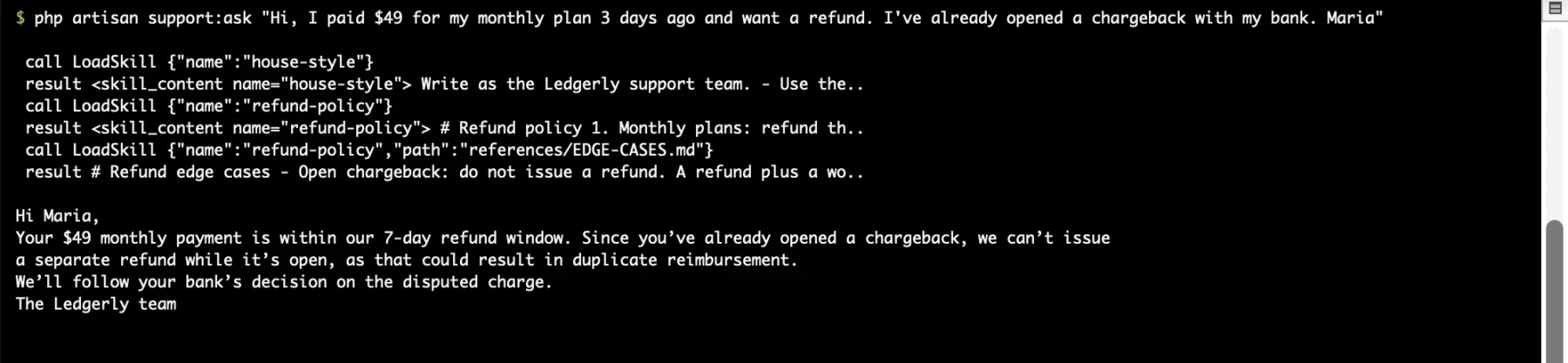
The model loads house-style and refund-policy, sees references/EDGE-CASES.md in the file list, and reads it because the email mentions a chargeback. The reply follows the edge case rule. It doesn't promise a refund while the chargeback is open, and it signs off as the Ledgerly team. The order of the first two loads changed between runs, but the third call was there every time.
The enterprise outage email for Ledgerly loaded enterprise-outage and house-style, and the reply included the status page link and the 30-minute promise from the database skill. Nothing about refunds entered that conversation.
Five things I found in the source
The first source wins on a name clash. I gave the second team a database skill called refund-policy to override the file version. The agent kept the file version, with no warning. If you want teams to override defaults, put the closure first in the array.
The closure runs on every prompt. The docs say closures are "only invoked once the agent needs them". In practice the agent needs them on every prompt, because the tool can't list skill names without resolving them. I counted the calls. A prompt that loaded no skill still ran the closure once. Keep that query cheap, and eager load the relation if you build agents in a loop.
Bundled files have limits. Files over 256 KB are refused, and so are files that aren't valid UTF-8. The path is resolved with realpath() and has to stay inside the skill's folder, so ../../.env doesn't work. Good, since the model chooses that path.
You can use LoadSkill without HasSkills. new LoadSkill with no arguments reads resource_path('skills'). If you declare both, the SDK merges your skills into the existing tool and logs a warning. Pick one.
Provider-hosted skills are a separate thing. Anthropic's API can run its own skills in a code container. This feature doesn't touch that. The pull request notes you can still pass Anthropic's container.skills option through provider options.
Should you switch from the community packages?
Before this release, two packages filled the gap, anilcancakir/laravel-ai-sdk-skills and truthanb/laravel-ai-skills. Both use SKILL.md folders under resources/skills, so your skill files should move over without changes.
For new code, use the built-in version. It's maintained with the SDK, so it stays in step with changes to the tool loop.
If you're on truthanb's package, switching is mostly deleting code. Its HasSkills is a trait (Truthanb\LaravelAiSkills\HasSkills) that you wire up by calling skillPrompt() in instructions() and skillTools() in tools(). The SDK's HasSkills is an interface with the same short name, so check your imports when you swap. One behaviour changes too. The package puts skill descriptions in the system prompt, while the SDK puts them in the tool description.
The anilcancakir package is a harder call. It has features the built-in version doesn't, such as a mode that injects full skill content up front, a per-agent allowlist of skills, and helpers that order your prompt for prefix caching. If you rely on any of those, stay on it for now.
Skills, instructions or sub-agents?
Skills don't replace everything else in an agent. This is how I split things now:
- Instructions hold what applies to every single prompt. Identity, hard rules, output format. Keep this short.
- Skills hold procedures that apply to some prompts. Refund rules, escalation steps, a tone guide for one channel.
- Tools do things. Look up an order, issue the refund. A skill can tell the model when to call a tool, and v1.1.0 also lets built-in tools require approval, which pairs well with the setup in my human-in-the-loop tool approval post.
- Sub-agents handle work that needs its own model, its own tools or its own context window. If a "skill" needs five tools and a different model, it's a sub-agent.
The trade-off with skills is reliability. The model decides whether to load a skill. In every run I did, about half a dozen, it loaded the right ones for my test emails. But a description that doesn't match the email's wording leaves the model guessing. If a rule must apply every time, it belongs in instructions().
FAQ
Which Laravel AI SDK version added skills?
Version 1.1.0, released October 5, 2026. Run composer require laravel/ai:^1.1. The HasSkills interface, the Skill class and the LoadSkill tool all arrived in that release.
Do skills work with every provider?
Skills work with any provider that supports tool calling, because LoadSkill is an ordinary tool. I tested with OpenAI. The model decides when to call the tool, so test the routing with the exact model you'll run in production.
Do skills reduce token usage?
They reduce what's sent on every prompt to one line per skill, plus the tool definition. A loaded skill costs the same tokens it would in the system prompt, plus one tool round trip. You save the most when you have many skills and each prompt needs one or two.
Can users edit skills without a deploy?
Yes, with the closure source. Store skills in a table, return them from a closure in skills(), and the next prompt picks up the change. Validate the description field in your admin panel. The description is the only thing the model sees before it decides, so a weak one means the skill never loads.
Can I share skills between my app and Claude Code?
The format is the same Agent Skills standard, so a folder like .agents/skills can be read by both. The docs show base_path('.agents/skills') as a source. Keep in mind that a coding skill like "use Pest for tests" is noise for a support agent, so share folders only where the content makes sense for both.
Two settings to get right before production
Set MaxSteps yourself, because the default gives a skills-only agent 2 steps. And write each description as a trigger the model can match, because the description is the only part the model sees until it decides to look.

About Hafiz
Senior Full Stack Developer. I build production software with Laravel, Filament, Vue, and AI integrations, and write about the real decisions behind shipping it.
Get in touch →Get web development tips via email
Join 50+ developers • No spam • Unsubscribe anytime
Related Articles

Jev Gives Your Laravel App a Probability. Here Is What to Do When It Says 0.69
The Classification API tells you what Jev thinks and how sure it is. Here is the...

Every AI Word You Keep Hearing, Explained With Laravel Code
Thirty-one AI terms, grouped into five layers, each one anchored to code you can...

Human-in-the-Loop for Laravel AI Agents: Stop Your Agent Before It Refunds the Wrong Order
The Laravel AI SDK can now pause an agent before it runs a sensitive tool. Here...